How to Set Up a Claude Code Statusline (Step-by-Step With /statusline)
Set up a custom Claude Code statusline in 60 seconds with /statusline. Show your /usage, /context, 5-hour reset time, and working directory as colored progress bars in every prompt. Full bash script included.
On this page
- How to set up a Claude Code statusline in 60 seconds
- What the Claude Code statusline actually is
- How I worked with Claude on this one
- The stack
- The bars
- Drawing a 10-slot bar in pure shell
- The reset timestamp
- Where Claude surprised me
- Where Claude fell short
- The full Claude Code statusline bash script
- Styling tips
- Where it is now
- What I’d do differently
I’m on Claude Code Max 5x. It’s a generous plan. It is also not infinite.
Three things kept catching me off guard. The 5-hour session window would fill up in the middle of a long chain of edits and suddenly I was on a cooldown I hadn’t seen coming. The 7-day rolling limit was a slower version of the same problem. And the context window would creep toward full during a deep session and I’d only notice when the responses got weirdly slow.
I knew all three numbers existed somewhere. You can already get the rate limits by running /usage in Claude Code, and the context window by running /context. I was running both commands several times an hour, which is exactly the friction I was trying to avoid in the first place.
It turns out Claude Code has a statusline feature that very few people seem to know about. It runs a shell command before every prompt and prints whatever that command returns at the bottom of your terminal. That’s the whole primitive. You get to decide what goes in it. So instead of typing /usage and /context on demand, I put both of them plus my working directory and my 5h reset time in the statusline and never have to ask again.
The good news: you don’t have to write any bash to get this. Claude Code does it for you.
How to set up a Claude Code statusline in 60 seconds
Inside any Claude Code session, type:
/statuslineThat fires the built-in statusline-setup agent. Then tell it, in plain English, what you want shown. Here’s roughly what I asked for:
I want my working directory, the model I’m using, the current git branch, my 5-hour usage window, my 7-day usage window, and my context window. Show the meters as severity-colored progress bars: green under 50%, yellow 50 to 80%, red over 80%. Put the reset time next to the 5-hour bar.
That single message is enough. The agent writes the bash, drops the script at ~/.claude/statusline-command.sh, and registers it in ~/.claude/settings.json for you. Restart Claude Code, run a prompt, and the statusline shows up under the input after the first response.
You can ask for whatever fields you want. The JSON the harness pipes to the script includes both rate-limit windows with reset timestamps, the context window, the working directory, and the model name. If you want the git branch, the agent will shell out to git to grab it. Mix and match.
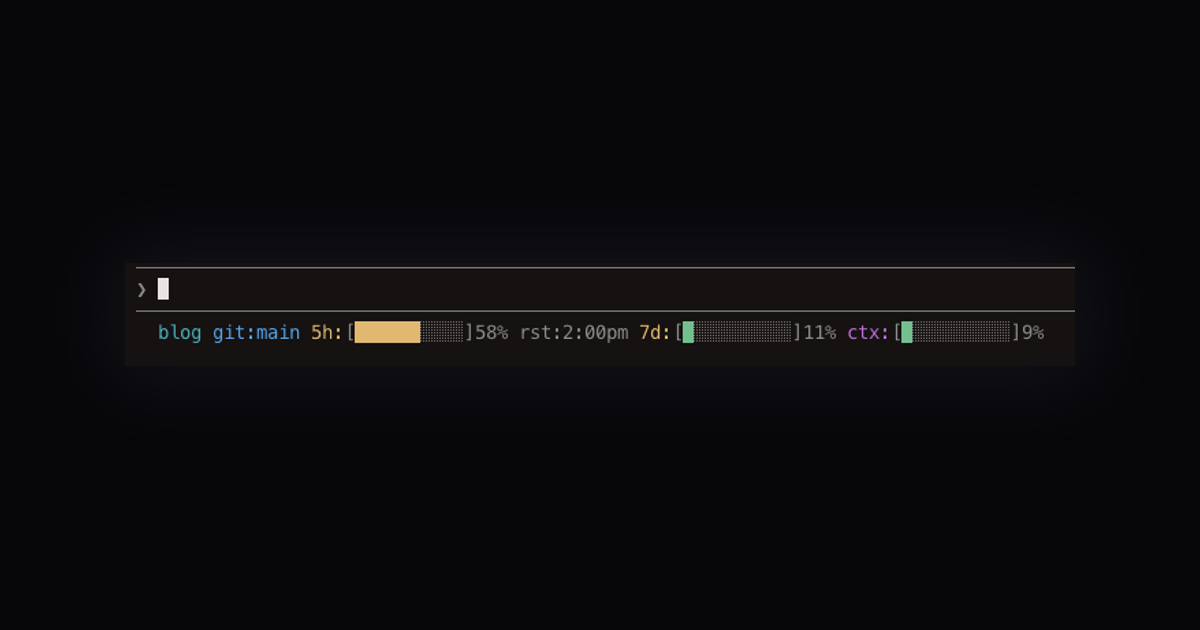
Here’s what mine looks like once it’s running:

Folder, 5h bar with reset time, 7d bar, context bar. The bars shift from green to yellow to red as they fill, so I can scan the line without reading numbers.
If the first pass doesn’t quite land, keep talking. “Move the folder to the front.” “Drop the percent number, the bar is enough.” “Use a shorter label for the 5-hour bar.” Each round is one short message. I went four rounds before I landed mine, and I never touched the bash myself.
That’s the whole setup. The rest of this post is the story of how mine came together, the bits where Claude surprised me, and the full bash script if you’d rather paste it directly than have the agent rebuild it.
What the Claude Code statusline actually is
A statusLine entry in your ~/.claude/settings.json that points at a script. Every time you hit enter on a Claude Code prompt, the harness pipes a JSON blob to that script over stdin and prints whatever your script writes to stdout.
The JSON blob contains useful fields. For my purposes:
cwd, the current working directoryrate_limits.five_hour.used_percentageandresets_atrate_limits.seven_day.used_percentagecontext_window.used_percentage
That is all I needed.
How I worked with Claude on this one
This was the statusline-setup agent end to end. I’d tell the agent what I wanted, it would write the script, I’d look at the output in my terminal, then come back and say “now change this.” Four rounds total:
- First pass: show 5h, 7d, context, cwd as percentages.
- “Shorter. Show just the folder, not the full path. Can we use bars instead of percentages?”
- “Move the folder to the front. Color the bars by severity.”
- “Add the reset time for the 5-hour bar.”
I didn’t hand-edit the script at any point. Every change went through the agent. Not because I was trying to be pure about it, just because the iterations were fast enough that writing prose was quicker than diffing bash.
The stack
bash + jq + ANSI escape codes. That’s it.
The script lives at ~/.claude/statusline-command.sh. The settings.json entry points at it:
"statusLine": {
  "type": "command",
  "command": "bash /Users/YOURNAME/.claude/statusline-command.sh"
}
No install step, no build, no dependencies beyond jq (which most dev machines already have).
The bars
I wanted the progress bars to be visually distinct from each other so I could spot trouble at a glance. Claude’s first pass had them all in the same dim color, which was technically working but useless for scanning. That was round three of corrections.
The fix was severity coloring. The filled portion of each bar gets green, yellow, or red depending on how full it is. The empty portion stays dim gray.
bar_color() {
  pct="$1"
  int_pct=$(printf '%.0f' "$pct" 2>/dev/null || echo 0)
  if [ "$int_pct" -ge 81 ] 2>/dev/null; then
    printf '\033[0;31m'   # red
  elif [ "$int_pct" -ge 50 ] 2>/dev/null; then
    printf '\033[0;33m'   # yellow
  else
    printf '\033[0;32m'   # green
  fi
}
Green below 50, yellow 50 to 80, red above 80. So when I glance down and see two greens and a yellow, I’m fine. Two yellows and a red, I wrap up the current task before I lose the session.
Drawing a 10-slot bar in pure shell
The bar itself is 10 Unicode blocks, some filled, some empty. This function computes how many slots to fill, then paints them with ANSI colors:
make_bar() {
  pct="$1"
  filled=$(printf '%.0f' "$(echo "$pct * 10 / 100" | bc -l 2>/dev/null || echo 0)")
  [ "$filled" -gt 10 ] 2>/dev/null && filled=10
  [ "$filled" -lt 0 ] 2>/dev/null && filled=0
  color=$(bar_color "$pct")
  reset='\033[0m'
  dim='\033[2;37m'
  bar=""
  i=0
  while [ "$i" -lt "$filled" ]; do
    bar="${bar}${color}\xe2\x96\x88${reset}"
    i=$((i + 1))
  done
  while [ "$i" -lt 10 ]; do
    bar="${bar}${dim}\xe2\x96\x91${reset}"
    i=$((i + 1))
  done
  printf '['; printf "$bar"; printf ']'
}
\xe2\x96\x88 is the full block character, \xe2\x96\x91 is the light shade. Escape color, character, reset, repeat. The trailing reset on every character matters. If you skip them, a tmux resize or scrollback can bleed color into adjacent text.
The reset timestamp
The nice detail I didn’t realize I wanted until I saw the finished version: the 5-hour bar shows when it resets, not just how full it is.
The JSON gives you resets_at as a Unix timestamp. On macOS, date -r takes a timestamp directly:
five_reset_str=$(date -r "$five_resets" "+%-I:%M%p" 2>/dev/null \
  | tr '[:upper:]' '[:lower:]')
[ -n "$five_reset_str" ] && five_reset_str=" rst:${five_reset_str}"
%-I strips the leading zero so 03:45pm renders as 3:45pm. tr lowercases it so it reads closer to how I’d write the time in a note: 3:45pm rather than 3:45PM.
Now the 5h segment looks like 5h:[████████░░]82% rst:3:45pm. I can see both the cost and the clock.
Where Claude surprised me
The severity coloring was me saying “make the bars not all gray, use any colors that make sense” and the agent came back with the green/yellow/red thresholds on its own. I was expecting I’d have to define the ranges. Not complicated logic, but it picked reasonable cutoffs without me specifying them and I didn’t need to adjust after.
Where Claude fell short
The first version wrote out full paths for the working directory. I told it I wanted just the folder name. That was a one-line basename fix. Easy, but it’s the kind of thing “good default” might have caught without me asking.
The first version also had ASCII bars all in the same dim gray. Functional but not useful. I had to explicitly ask for color differentiation. On re-read, my original prompt did ask for visual bars but didn’t say anything about severity, so that’s fair. Still, “make the bars informative” would have been my one-shot prompt if I were writing it now.
It also wrote the code to extract rate_limits.five_hour.resets_at before confirming the field actually existed in the JSON payload. It was a plausible path, and it happened to be correct, but it was a guess. For a less obvious field I’d have wasted a round on a hallucinated schema.
The full Claude Code statusline bash script
If you’d rather read the bash yourself, save this as ~/.claude/statusline-command.sh:
#!/bin/sh
input=$(cat)

cwd=$(echo "$input" | jq -r '.cwd // .workspace.current_dir // empty')
ctx_used=$(echo "$input" | jq -r '.context_window.used_percentage // empty')
five_pct=$(echo "$input" | jq -r '.rate_limits.five_hour.used_percentage // empty')
five_resets=$(echo "$input" | jq -r '.rate_limits.five_hour.resets_at // empty')
week_pct=$(echo "$input" | jq -r '.rate_limits.seven_day.used_percentage // empty')

bar_color() {
  pct="$1"
  int_pct=$(printf '%.0f' "$pct" 2>/dev/null || echo 0)
  if [ "$int_pct" -ge 81 ] 2>/dev/null; then
    printf '\033[0;31m'
  elif [ "$int_pct" -ge 50 ] 2>/dev/null; then
    printf '\033[0;33m'
  else
    printf '\033[0;32m'
  fi
}

make_bar() {
  pct="$1"
  filled=$(printf '%.0f' "$(echo "$pct * 10 / 100" | bc -l 2>/dev/null || echo 0)")
  [ "$filled" -gt 10 ] 2>/dev/null && filled=10
  [ "$filled" -lt 0 ] 2>/dev/null && filled=0
  color=$(bar_color "$pct")
  reset='\033[0m'
  dim='\033[2;37m'
  bar=""
  i=0
  while [ "$i" -lt "$filled" ]; do
    bar="${bar}${color}\xe2\x96\x88${reset}"
    i=$((i + 1))
  done
  while [ "$i" -lt 10 ]; do
    bar="${bar}${dim}\xe2\x96\x91${reset}"
    i=$((i + 1))
  done
  printf '['; printf "$bar"; printf ']'
}

parts=""

if [ -n "$cwd" ]; then
  folder=$(basename "$cwd")
  parts="${parts}$(printf '\033[0;36m%s\033[0m ' "$folder")"
fi

if [ -n "$five_pct" ]; then
  bar=$(make_bar "$five_pct")
  five_reset_str=""
  if [ -n "$five_resets" ]; then
    five_reset_str=$(date -r "$five_resets" "+%-I:%M%p" 2>/dev/null \
      | tr '[:upper:]' '[:lower:]')
    [ -n "$five_reset_str" ] && five_reset_str=" rst:${five_reset_str}"
  fi
  parts="${parts}$(printf '\033[0;33m5h:\033[0m%s%.0f%%%s ' "$bar" "$five_pct" "$five_reset_str")"
fi

if [ -n "$week_pct" ]; then
  bar=$(make_bar "$week_pct")
  parts="${parts}$(printf '\033[0;33m7d:\033[0m%s%.0f%% ' "$bar" "$week_pct")"
fi

if [ -n "$ctx_used" ]; then
  bar=$(make_bar "$ctx_used")
  parts="${parts}$(printf '\033[0;35mctx:\033[0m%s%.0f%%' "$bar" "$ctx_used")"
fi

printf '%s' "$parts"
Make it executable (chmod +x ~/.claude/statusline-command.sh), then add this to ~/.claude/settings.json:
"statusLine": {
  "type": "command",
  "command": "bash /Users/YOURNAME/.claude/statusline-command.sh"
}
Replace YOURNAME with your actual home directory. Restart Claude Code. Run a prompt. The statusline shows up after the first response, which is when the JSON starts carrying real usage numbers.
Styling tips
A few things I learned by iterating on this:
Label colors matter more than bar colors. I used cyan for the cwd, yellow for 5h and 7d labels, purple for ctx. When I glance down, the label colors are what tell me which segment I’m looking at. The bar colors just tell me severity.
Keep segments narrow. Ten-slot bars are small enough to fit four segments on one line in a typical terminal. I tried 20-slot bars at one point and they wrapped on my laptop screen.
Always reset after every ANSI escape. I’ve been burned by color bleeding into the rest of the terminal after a process crashes mid-write. The ${reset} after every character is paranoid but cheap.
Hide segments when the data isn’t there yet. The rate-limit numbers aren’t populated until Claude Code has made at least one API call in the session. If you print them unconditionally you get an ugly 5h:[░░░░░░░░░░] on a fresh start. The if [ -n ... ] guards handle that.
Where it is now
Running on my machine. I see it every prompt. It has already saved me from one 5h wall I didn’t notice coming. Low stakes, nice feature, took about an hour of back-and-forth to land.
What I’d do differently
Tell Claude the severity thresholds up front. I let the agent pick them and it happened to get it right, but on a different day I might have wanted different cutoffs and wasted a round correcting. Specifying “green under 50, yellow 50-80, red over 80” in the first prompt costs nothing.
Ask the agent to verify fields in the JSON before writing code. The resets_at field happened to exist. For a feature you’re actually shipping, the “does this field exist” check should happen before the “format it as a time” code. A one-line jq against a sample payload would have caught it.
Don’t wait to try it. I almost didn’t build this because it felt like yak-shaving. It took under an hour and changed how I pace work inside Claude Code. If you’ve never opened the statusLine key in your settings.json, that’s where to start.
Frequently Asked Questions
How do I set up a statusline in Claude Code?
What data does the Claude Code statusline JSON contain?
What dependencies does the Claude Code statusline script need?
How does the severity coloring on the statusline bars work?
Can I see when my Claude Code 5-hour rate limit resets?
Travel research publisher and senior staff engineer
Caden Sorenson runs Vientapps, an independent travel research and tools site covering airline carry-on policies, packing lists, and head-to-head airline, cruise, and destination comparisons, with everything cited to primary sources. He's a senior staff engineer with 15+ years of experience building iOS apps, web platforms, and developer tools, and a Computer Science graduate from Utah State University. Based in Logan, Utah.
Related posts
- Building a Travel Power Adapter Tool with Claude in a WeekendHow I turned leftover destination data into a 221-country power adapter finder with plug types and voltage comparison. The first version was unusable.
- Building a Layover Calculator That Knows Every Terminal at JFKHow I built a connection time calculator covering 70 airports with pairwise terminal transfers, customs buffers, and a five-factor assessment algorithm, then spent half the day fixing dark mode.
- I Let Claude Design My Homepage Hero and Shipped What It BuiltI gave Claude Design six 'decide for me' answers and it came back with a three-layer canvas flight animation. Two concepts, one conversation, and the whole thing is live on my homepage now.
Stay in the loop
Get notified when I publish new posts. No spam, unsubscribe anytime.